You have created a professional property walkthrough video. The home looks impressive, the rooms are highlighted perfectly, and the video gives potential buyers a realistic feel of the property.
Now the question is: where should that video appear?
Many real estate professionals simply add a video link to their listing page. While this works, it creates an extra step for buyers. They have to leave your website, open another platform, and navigate away from the property details they were viewing.
A better approach is to embed a video on your real estate listing page.
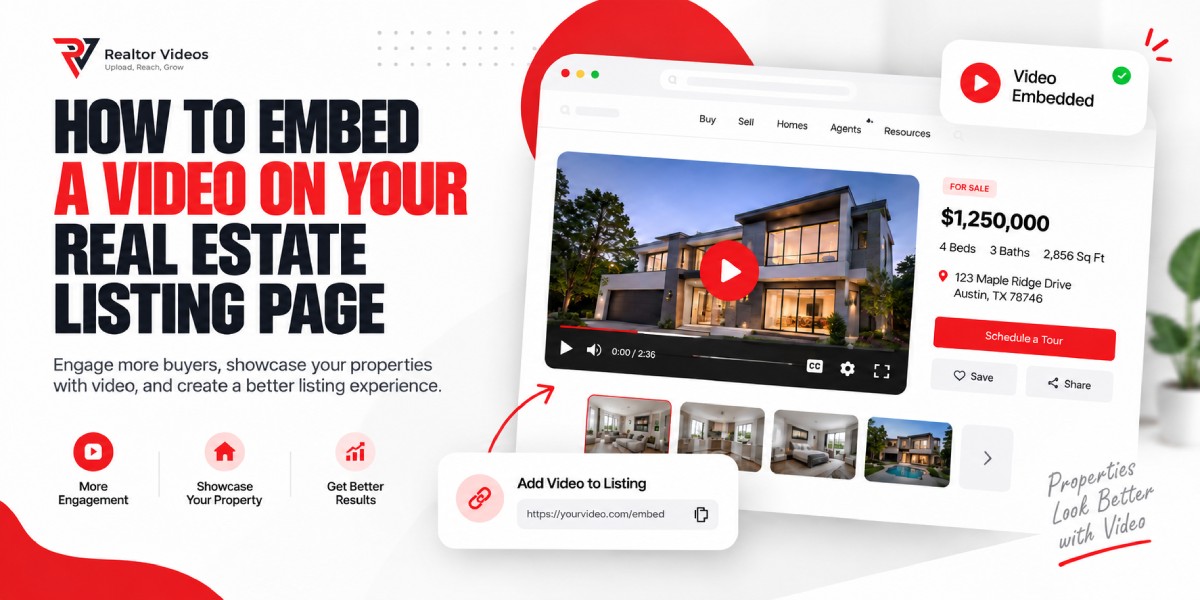
An embedded property video plays directly on your website, allowing buyers to watch the walkthrough without leaving the listing page. This creates a smoother experience, keeps visitors engaged, and helps your property marketing feel more professional.
Whether you are a realtor, brokerage, or property marketing company, embedding listing videos is a simple way to improve how buyers interact with your listings.
What Does It Mean to Embed a Video?
Video embedding means displaying a video player directly inside a webpage instead of sending visitors to another website.
When you embed a video, the actual video file remains stored on a hosting platform, while your website displays the player where you want it to appear.
For example:
Video link approach: Click here to watch the property tour. The visitor leaves your website.
Embedded video approach: The property video appears directly on the listing page. The visitor stays on your website and watches the video immediately.
Uploading vs Embedding a Video
Uploading and embedding are different processes.
| Uploading a Video | Embedding a Video |
|---|---|
| Stores the video file directly on a server | Displays a video player from a hosting platform |
| Uses website storage and resources | Keeps the website lighter |
| Requires more server management | Easier to maintain |
| Can affect website performance | Designed for efficient playback |
A simple analogy:
Think of embedding like placing a television in your office. The TV is visible in your space, but the broadcast is delivered from another source.
Your website displays the video player, while the hosting platform handles storage, streaming, and delivery.
Why Realtors Should Embed Listing Videos
Property videos have become an important part of modern real estate marketing. However, where and how those videos are displayed matters.
Embedding videos directly into listing pages provides several advantages.
Better Buyer Experience
Buyers want quick access to property information.
An embedded real estate listing video allows visitors to view a home walkthrough immediately without opening another website or leaving the listing page.
This creates a smoother browsing experience.
More Professional Presentation
A clean video player makes a property page feel more complete.
Instead of sending buyers to an external platform, the video becomes part of your own branded property experience.
Improved Engagement
Videos encourage visitors to spend more time exploring a property.
A buyer who watches a walkthrough may continue reviewing:
- Property features
- Photos
- Floor plans
- Agent information
- Contact options
Mobile-Friendly Viewing
Many buyers search for homes on smartphones.
A properly embedded video player automatically adjusts to different screen sizes, making property tours easier to watch on mobile devices.
Better Branding Control
Public video platforms may show:
- Advertisements
- Recommended content
- External branding
- Unrelated videos
Professional real estate video hosting gives agents more control over the viewing experience.
What You Need Before Embedding a Property Video
Before adding a video to your listing page, prepare these four things:
1. Property Video
You need a completed real estate listing video in a supported format, such as MP4.
A well-produced video should include:
- Clear visuals
- Stable camera movement
- Good lighting
- Accurate property details
2. Video Hosting Platform
A hosting platform stores your video and delivers playback to viewers.
For real estate professionals, useful features include:
- Fast streaming
- Privacy controls
- Analytics
- Clean embeds
3. Embed Code
The hosting platform provides a small piece of code that tells your website where and how to display the video player.
You usually only need to copy and paste this code.
4. Website Access
You need access to the website or listing page where the video will appear.
This may include:
- Website dashboard access
- CMS access
- Help from a developer
Step-by-Step Guide: How to Embed a Video on Your Real Estate Listing Page
Step 1: Upload Your Property Video
The first step is uploading your real estate listing video to a video hosting platform.
The platform processes the video and prepares it for online playback.
Why it matters
Professional hosting platforms optimize videos for different devices and connection speeds, helping visitors receive smoother playback.
Common mistake
Uploading large video files directly to your website. Large files can slow down your website and create poor user experiences.
Practical tip
Use a dedicated video hosting platform instead of relying on your website server to deliver large property videos.
Step 2: Wait for Video Processing
After uploading, the video needs to be processed before it is ready for embedding.
Processing may include:
- Video optimization
- Creating playback versions
- Generating thumbnails
Why it matters
Processing ensures visitors can watch the video properly across different browsers and devices.
Common mistake
Copying the embed code before processing is complete.
Practical tip
Wait until the hosting platform confirms the video is ready.
Step 3: Copy the Embed Code
Once your video is ready, find the embed option inside your hosting dashboard.
It may be labeled:
- Embed
- Share
- Add to website
- Copy code
Copy the complete embed code.
Why it matters
The embed code connects your website page with the hosted video player.
Common mistake
Copying only part of the code.
Practical tip
Always use the platform’s copy button instead of manually selecting the code.
Step 4: Open Your Real Estate Listing Page
Log in to your website editor and open the page where you want the video displayed.
This could be:
- Individual property pages
- Landing pages
- Property showcase pages
- Blog posts
Why it matters
The video needs to be placed where buyers naturally look for property information.
Common mistake
Adding videos in locations where visitors cannot easily find them.
Practical tip
Place videos near important property details or photos.
Step 5: Paste the Embed Code
Most website builders provide an embed block, HTML section, or custom code area.
Paste your video embed code into that section.
Why it matters
This allows your website to display the video player without uploading the entire video file.
Common mistake
Pasting embed code into a normal text area.
Practical tip
Use the website editor’s dedicated embed or HTML element.
Step 6: Publish the Listing Page
After adding the embed code, save your changes and publish the page.
Why it matters
Your changes will not appear publicly until the page is updated.
Common mistake
Testing only inside the website editor.
Practical tip
Always check the live version of the page.
Step 7: Test on Desktop and Mobile
Open your listing page on multiple devices.
Check:
- Video playback
- Loading speed
- Player size
- Mobile layout
- Sound controls
Why it matters
Buyers use different devices when searching for properties.
Common mistake
Assuming a video that works on desktop will automatically work everywhere.
Practical tip
Test using both Wi-Fi and mobile internet connections.
Common Video Embedding Problems and Solutions
Even though embedding a property video is usually simple, some issues can prevent the video from displaying correctly.
Below are the most common problems real estate professionals encounter.
Video Is Not Displaying
Possible Cause
- Incorrect embed code
- Video is still processing
- Website editor does not support the embed format
- Video permissions are restricted
Quick Solution
Check that:
- The embed code was copied completely
- The video is published and available
- The correct embed section was used on your website
Broken Embed Code
Possible Cause
- Only part of the code was copied
- Extra characters were added
- The website editor changed the code formatting
Quick Solution
Copy the embed code again directly from your hosting platform and replace the existing version. Avoid manually editing the code unless you know exactly what needs to change.
Privacy Settings Prevent Playback
Possible Cause
The video may have restrictions such as:
- Private viewing
- Password protection
- Domain restrictions
Quick Solution
Review your video privacy settings and confirm that your listing website is allowed to display the video. Privacy controls are especially useful for real estate professionals who want to control where property videos appear.
Slow Video Loading
Possible Cause
- Large video files
- Poor hosting performance
- Unoptimized video delivery
Quick Solution
Use a professional video hosting solution that supports optimized streaming. A good hosting platform should automatically deliver the best playback experience based on the viewer’s device and internet connection.
Video Does Not Fit Properly on Mobile
Possible Cause
- Fixed video dimensions
- Non-responsive embed settings
- Website layout conflicts
Quick Solution
Use a responsive video player that automatically adjusts to different screen sizes. Always check how your property video looks on smartphones and tablets.
Best Practices for Embedded Property Videos
Embedding a video is only the beginning. The way your video is presented can affect the buyer experience.
Follow these practical tips.
1. Use Responsive Video Players
A responsive player automatically adapts to:
- Desktop screens
- Tablets
- Smartphones
This prevents issues such as videos appearing too small or breaking your page layout.
2. Optimize Video Quality
High-quality videos help buyers understand a property better.
However, larger files are not always better.
Balance quality with performance by using:
- Proper compression
- Modern video formats
- Optimized streaming
3. Choose an Effective Thumbnail
Your thumbnail creates the first impression.
A good property video thumbnail should show:
- An attractive room
- A key property feature
- A clear preview of the home
Avoid generic images that do not represent the listing.
4. Test Across Multiple Devices
Before promoting your listing, check the video on:
- Desktop computers
- Mobile phones
- Tablets
Make sure the video loads correctly and the controls are easy to use.
5. Keep Playback Distraction-Free
The purpose of a listing video is to showcase the property.
Avoid experiences that distract buyers, such as:
- Unrelated recommendations
- Advertisements
- Excessive branding
A clean viewing environment helps visitors focus on the home.
Why Professional Video Hosting Matters for Realtors
Many real estate professionals use general video platforms because they are easy to access.
However, platforms designed for general audiences are not always built for property marketing.
A dedicated real estate video hosting platform provides more control over how buyers experience your listings.
| Feature | General Video Platforms | Dedicated Real Estate Video Hosting |
|---|---|---|
| Advertisements | May display ads | Designed for ad-free viewing |
| Branding | Platform branding may appear | Cleaner property presentation |
| Embed control | Limited options | Domain-level embed controls |
| Privacy | Basic sharing options | Advanced privacy settings |
| Analytics | Limited property insights | Viewer engagement tracking |
| Buyer experience | Mixed with unrelated content | Focused on the property |
For real estate professionals, the goal is not only uploading videos. It is creating a professional digital experience where buyers can explore properties without unnecessary distractions.
How therealtorvideos.com Helps Real Estate Professionals
therealtorvideos.com is designed specifically for real estate professionals who need reliable property video hosting and clean website embeds.
The platform helps agents, brokerages, and property marketers present listing videos professionally with features such as:
Professional Video Embeds
Property videos can be displayed directly on listing pages without sending buyers to another platform.
Ad-Free Playback
Visitors can focus on the property without unrelated advertisements or distractions.
Analytics
Video analytics help professionals understand viewer engagement and how audiences interact with property marketing videos.
Privacy Controls
Agents can manage how videos are shared and where they appear.
Domain-Level Embed Control
Website owners can control which domains are allowed to display their videos.
MLS-Friendly Hosting
The platform is built around professional real estate workflows while recognizing that MLS and IDX requirements vary by location and provider.
Frequently Asked Questions
How do I embed a property video?
Upload your video to a hosting platform, copy the embed code, paste it into your listing page editor, and publish the page. Most modern website builders support this process.
Can I embed YouTube videos on my real estate listing page?
Yes, many websites support YouTube embeds. However, dedicated real estate video hosting can provide more control over branding, privacy, analytics, and the viewing experience.
Does embedding a video affect SEO?
Embedding a video can improve user experience and engagement. However, video embedding alone does not guarantee higher rankings. SEO depends on many factors, including content quality, page performance, and technical optimization.
Can I embed private property videos?
Yes. Many professional video hosting platforms support privacy settings that allow restricted viewing and domain-based controls.
Do embedded videos work on mobile devices?
Yes. When properly implemented with responsive players, embedded property videos work across smartphones, tablets, and desktop devices.
Can I replace an embedded video after publishing?
Yes. Many hosting platforms allow you to update or replace videos while keeping the same embed location.
Can I embed videos on IDX websites?
Sometimes. Video support depends on your IDX provider, MLS rules, and local regulations. Always verify requirements before publishing listing videos.
Why use dedicated real estate video hosting instead of a general platform?
Dedicated real estate video hosting provides features designed for property marketing, including cleaner embeds, privacy controls, analytics, and a more professional buyer experience.
Conclusion
Learning how to embed a video on your real estate listing page is easier than many professionals expect.
The process is straightforward:
- Upload your property video.
- Wait for processing.
- Copy the embed code.
- Add it to your listing page.
- Test the experience across devices.
Embedded property videos help buyers explore homes more easily while allowing real estate professionals to create a more polished online presence.
With the right video hosting solution, agents and brokerages can deliver faster playback, cleaner presentations, and a better property viewing experience.
Improve Your Property Video Experience
therealtorvideos.com helps real estate professionals host and embed property videos with:
- Professional video embeds
- Ad-free playback
- Analytics
- Privacy controls
- Domain-level embed management
- Reliable streaming
Explore real estate video hosting and learn more about video hosting features to create a smoother experience for property buyers.